Штрафы ГИБДД: проверка с фото
- 4.7
- Rating
- 10.00M
- Installs
- Free
- Price

 Analysis by App-foxy
When I first opened Штрафы ГИБДД: проверка с фото, I understood its purpose quickly: it is a practical Auto & Vehicles app for people who want to deal with Russian traffic-related tasks from one place. The focus is not entertainment or complicated car management. It is about checking traffic fines, handling toll-road payments in Russia, looking up a vehicle by VIN, and arranging OSAGO online.
That combination makes it more useful than a single-purpose fine checker, especially if you drive regularly and prefer not to jump between several services. I would describe it as a utility for moments when you need a clear answer quickly: is there an outstanding fine, does a vehicle record need checking, or is an insurance task waiting to be completed? The app is free, aimed at Everyone, and comes from Pays LLC – Штрафы ГИБДД.
My overall impression is positive, but I would not treat it as a replacement for careful reading of official documents. It can make routine checks easier, yet the responsibility for entering the correct vehicle and driver information still rests with you. That distinction matters, particularly when a payment deadline or insurance detail is involved.
You May Also Like

 AccuWeather: Weather Radar
AccuWeather Review: A Quick, Clear Forecast for Everyday Decisions
For everyday plans, the best forecast is the one you can understand quickly. AccuWeather makes rain timing, radar, and local conditions easy to act on, with a few trade-offs.

 Hill Climb Racing
Why Hill Climb Racing Still Turns Crashes Into One More Run
A tiny car, a bumpy hill and one more upgrade: Hill Climb Racing keeps resurfacing because its simple chaos makes every near-miss feel personal.

 AliExpress - Shopping App
AliExpress Makes Global Shopping Feel Personal, but Shoppers Bear the Risk
AliExpress turns a global marketplace into a pocket-sized discovery engine. Its reach is useful, its shopping loop compelling, and its trade-offs easy to miss.

 Lords Mobile: Kingdom Wars
Lords Mobile Is a Kingdom-Building Routine, Not a Quick Match
A case-by-case verdict on the building, battles, device demands, and social commitments that make Lords Mobile rewarding for some players and exhausting for others.

 PDF Scanner app - TapScanner
TapScanner Makes Paperwork Easier to Capture, Check, and Share
TapScanner makes scanning with a phone feel less like a rescue operation and more like a dependable step in getting work done. Its capture tools are useful, though not flawless.

 Block Blast!
 Shows How Much a Puzzle Game Can Leave Out
A quiet grid game shows why puzzle players increasingly value instant clarity, repeatable skill and low-pressure play—and where the genre still needs to catch up.
More From Our News Desk
View All News


What to expect before you begin
The app has been available since February 6, 2015, and its scale suggests that it is not a new experiment. It has passed 10 million installs and holds a 4.7 average from around 893 thousand ratings. Those figures do not guarantee that every screen will suit every driver, but they do indicate that the app has become a familiar tool for a large audience.
The first thing to understand is that this is a group of related services rather than one narrow button. The traffic-fine function is likely to be the reason most people install it, while the VIN check, Russian toll-road support, and OSAGO workflow make it more useful as an occasional vehicle companion. I found that thinking of it as a small dashboard helps: each task starts from a different piece of information and ends with a different kind of result.
For a first-time user, the most reassuring approach is to decide what you want to accomplish before tapping around. If your immediate goal is a fine check, keep the relevant vehicle or registration information nearby. If you are checking a car by VIN, use the VIN exactly as it appears on the vehicle documents. If you are dealing with OSAGO, have the necessary insurance and vehicle details ready rather than trying to remember them while moving through the process.
The quickest route to a useful result is to prepare the exact vehicle information first. This sounds obvious, but it prevents the most common source of frustration in administrative apps: entering a partial or mistyped identifier and then wondering whether the service is empty or the search was simply incorrect.
The app is free to install, which lowers the barrier for occasional users. Someone who only wants to check a possible fine after a journey does not need to commit to a paid subscription before trying the basic idea. At the same time, free access should not encourage careless decisions. A result connected to a vehicle or insurance matter deserves the same attention as a paper notice.
Who will get the most from it
I think the strongest audience is a driver who wants one familiar place for several Russian vehicle tasks. It is especially convenient for people who sometimes use toll roads, own more than one car, are preparing to buy a used vehicle, or want to review OSAGO options without starting from scratch each time.
It can also help someone who does not drive every day but wants a simple routine after a long trip. Instead of waiting for a letter or relying on memory, that person can open the app and perform a deliberate check. The value is less about constant use and more about reducing uncertainty when a vehicle-related question appears.
I would be more cautious about recommending it to someone who expects a universal car-management platform. The app’s stated focus is fines, toll roads, VIN checks, and OSAGO. It should not be chosen on the assumption that it will replace every service connected with maintenance, parking, fuel, repairs, or local transport.
Setting up a useful first check
After installation, I would begin with the task that brought me there instead of exploring every available area. This keeps the first session short and makes it easier to tell whether the app solves your actual problem. For a fine check, start with the vehicle details requested on screen and compare every character with your registration documents before submitting.
That comparison step is more important than it looks. Vehicle identifiers are easy to mistype, particularly when letters and numbers look similar. If the result seems unexpectedly clean or unexpectedly concerning, repeat the entry carefully before drawing a conclusion. A second check using the same information is not wasted time when the result could affect payment or a conversation with another driver.
For a VIN search, copy the complete VIN rather than relying on a shortened note or a photograph that cuts off part of the sequence. The purpose of a VIN check is to connect the query to one specific vehicle, so precision matters more here than speed. If you are considering a used car, I would run the check before becoming emotionally committed to the purchase. It is easier to evaluate information calmly before money or promises are involved.
The OSAGO area calls for a different kind of preparation. Insurance workflows are detail-heavy, and rushing through them can create avoidable corrections later. I would keep the vehicle documents and driver information together, then read each field before continuing. The convenience of completing an insurance task online is valuable only when the underlying details are accurate.
For toll roads in Russia, the best setup depends on the journey rather than the car alone. If you are planning a trip, use the app as part of your preparation instead of waiting until you are already on the road. Checking the relevant toll-road task before departure gives you time to notice missing information and avoids trying to manage an administrative payment while distracted by travel.
One practical habit is to keep a small, secure note with the vehicle information you commonly need, rather than searching through several documents every time. I would not store sensitive details carelessly, but having the correct source available makes the app much faster to use and reduces repeated typing. This is particularly helpful for households with multiple vehicles, where choosing the wrong car can be easier than entering a wrong character.
The first meaningful success
The clearest first success is a completed fine check that produces an understandable result. To reach that point, open the fine-checking function, enter the requested vehicle information carefully, review it once, and submit the search. When the result appears, do not stop at the headline. Read the associated details and make sure they relate to the vehicle you intended to check.
If the app shows a fine, I would treat the result as a prompt to inspect the information, not as a reason to tap payment immediately. Check the date, vehicle connection, and any identifying details presented in the result. If something looks wrong, pause and verify it through the appropriate official documentation or channel before paying. The app can make discovery and handling more convenient, but convenience should not replace verification.
If nothing appears, that can be reassuring, but I would still make sure the search used the right vehicle and complete information. A clean result is meaningful only when the query was accurate. This is one of the app’s less obvious lessons: the quality of the outcome depends heavily on the quality of the input.
Once the first check works, you can try the other sections with a clearer idea of how the app is organized. A VIN lookup is a sensible next experiment if you are evaluating a vehicle. OSAGO is more appropriate when you are ready to deal with insurance details. Toll-road functions make the most sense around an actual journey, when the result can immediately help with planning.
I would not test every section randomly just to prove that the app has several functions. The better workflow is task-based. Use the fine area when a fine question exists, the VIN area when a vehicle-history question exists, and the insurance area when a policy task is genuinely due. That keeps the app useful rather than turning it into another place where unfinished forms accumulate.
Where new users can become confused
The biggest possible confusion is assuming that all four areas work from the same information. They do not serve the same purpose. A traffic-fine search, a VIN lookup, a toll-road action, and an OSAGO process each ask a different practical question. If you enter information intended for one task into another, the app may feel less clear even though the issue is really a mismatch between the task and the data.
Another point of friction is the difference between checking and acting. Looking up a fine is an information step; paying it is a financial step. Looking up a car by VIN is an evaluation step; buying the car is a much larger decision. Starting an OSAGO application is not the same as having reviewed every policy condition. I find it helpful to separate these stages mentally and avoid treating a convenient result as the end of the decision.
Users may also expect the app to know which vehicle they mean automatically. That is not a safe assumption, especially when several cars are involved. Before submitting anything, confirm the selected or entered vehicle details. A quick glance at the identifier is a small habit that can prevent a much larger mistake.
There is also a human limitation that no interface can remove: official vehicle and insurance information can be stressful to interpret. If a result affects a legal obligation, a payment, or a purchase, take a screenshot or note the relevant details for your own records, then compare them with the original documents. I would not rely on memory after closing the screen.
Privacy is another reason to use the app thoughtfully. Vehicle identifiers, insurance information, and payment-related details should be handled as personal information. Use the app in a private setting when possible, avoid sharing screenshots that expose more than necessary, and do not enter another person’s details casually. These are sensible precautions for any vehicle-service app, but they matter particularly here because several sensitive tasks sit together.
The app’s broad feature set can be a strength and a weakness. It is convenient to have fines, toll roads, VIN checks, and OSAGO in one place, but a user who only wants a minimalist fine checker may find the wider scope unnecessary. In that case, an official single-purpose service may feel more direct. On the other hand, switching between separate services becomes tiring when you regularly handle several vehicle tasks, and that is where this app earns its place.
How it compares with the usual alternatives
The usual alternative is to use separate official portals, insurer websites, toll-road services, and vehicle-check tools. That approach can be preferable when you want the most direct relationship with one agency or provider, or when a transaction is unusually important and you want to complete it at the source. It may also make the origin of each result clearer.
The advantage of this app is concentration. Instead of remembering which service handles which question, you have a recognizable starting point for several Russian driving tasks. For everyday checking, that is a real convenience. The trade-off is that a combined app requires you to understand which section you are using and to remain alert to the details of each process.
I would use it as a practical front door, especially for quick checks and routine preparation, while keeping official documents and source information available for confirmation. That is a more realistic role than expecting one app to become the final authority for every situation. It gives you speed and organization without removing the need for judgement.
Useful routines after the first session
A good routine is to check before you need to act. If you have completed a long drive, make the fine check part of your later paperwork rather than waiting until a notice becomes urgent. If you are preparing to sell or buy a vehicle, run the VIN-related check early enough that an unexpected result can change your plans. If a long trip is coming, handle toll-road preparation before departure.
For people with multiple vehicles, label your own notes clearly and work on one car at a time. Do not enter details for several cars in one rushed session. Finish the check for the first vehicle, review the result, then move to the next. This simple separation reduces the chance of confusing one vehicle’s information with another’s.
Another useful habit is to read the result screen fully before leaving it. A short summary may answer your immediate question, while the supporting details explain what the result actually refers to. I would especially do this when the outcome is unexpected. The extra minute is worthwhile when the next action could involve money, insurance, or a vehicle purchase.
People often ask whether the app is suitable for occasional use. In my view, yes: the free entry point and focused utilities make sense even if you open it only when a specific need appears. It is not necessary to build a daily habit. Occasional users should simply keep their documents close and avoid treating a quick search as a substitute for checking the underlying paperwork.
Another natural question is whether it is useful before buying a used car. The VIN-check function gives it a clear role in that situation, but I would use it as one part of a broader inspection. A digital result cannot replace seeing the vehicle, reviewing its documents, checking its mechanical condition, and asking the seller direct questions. The app can improve your starting position; it should not make the whole purchase decision for you.
Drivers also wonder whether one app is better than separate services. My answer depends on the way you drive. If you only ever need one official function and want the shortest possible path, a dedicated source may be better. If you regularly move between fines, toll roads, VIN checks, and OSAGO, the combined layout is more practical and easier to remember.
The developer, Pays LLC – Штрафы ГИБДД, has positioned the app around these specific Russian driving needs rather than general automotive entertainment. That focus is useful because the screens are connected by real-life paperwork and travel situations. It also means the app is not a natural fit for someone looking for repair tracking, fuel budgeting, or a broad vehicle diary.
My recommendation for a first-time driver
I would install it when I wanted a convenient starting point for Russian traffic fines and related vehicle tasks, especially if I expected to use more than one of its sections. I would begin with one accurately prepared fine check, confirm the result carefully, and only then explore VIN, toll-road, or OSAGO functions that match an actual need.
The app’s high average rating and large installed audience make it easy to see why it attracts attention, but my recommendation is based more on its practical shape than on popularity. It brings several relevant tasks together, costs nothing to start, and can turn an annoying search across multiple services into a more manageable routine.
Its limitations are equally clear. It cannot correct inaccurate information, remove the need to read insurance conditions, or replace official confirmation when a result is disputed. Users who prefer a single official source for every transaction may feel more comfortable elsewhere. Those who want a broad car-management tool will also need another solution.
For everyone else, the best next step is simple: install it, choose the exact task you need today, and prepare the matching vehicle information before opening the form. Complete one careful check rather than rushing through every feature. If that first result is useful, keep the app as a convenient vehicle-services hub; if your needs are narrower, compare its workflow with the dedicated official alternative you already trust.
That is where Штрафы ГИБДД: проверка с фото works best in my experience: not as a magic answer to every driving problem, but as a focused, free utility that helps organize several important Russian vehicle tasks. Used carefully, it can save time and reduce uncertainty without encouraging you to skip the verification that serious traffic and insurance matters deserve.
FAQs for Штрафы ГИБДД: проверка с фото
01What is Штрафы ГИБДД: проверка с фото used for?
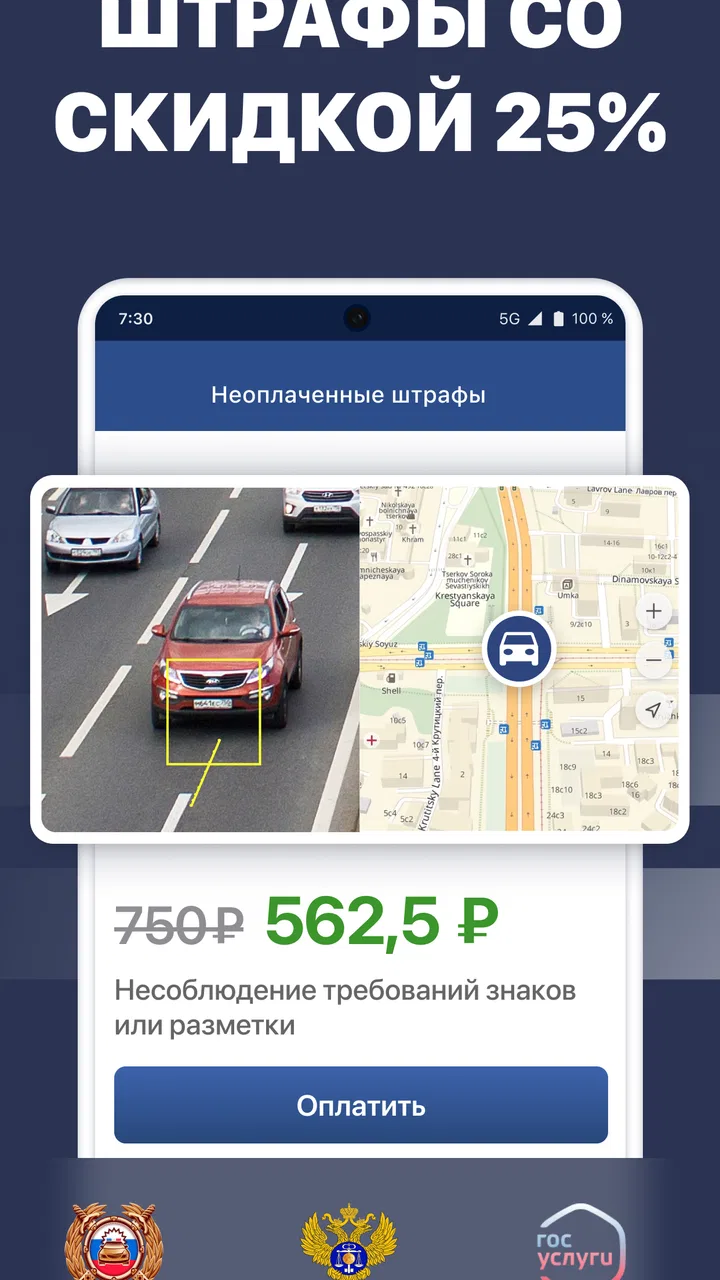
Штрафы ГИБДД: проверка с фото is designed to help users check traffic fines issued in Russia and review available violation details. Depending on the information provided by the relevant authorities, the app may display the date, location, amount, legal basis, and a photograph of the alleged violation. It is mainly intended as a convenient information and payment assistant, not as a replacement for official government records.
02What information do I need to check my traffic fines?
The information required can vary depending on the checking method supported by the app. Typically, users may need a vehicle registration certificate number, driver’s license details, or the unique fine identification number shown on an official notice. Entering the data carefully is important because even a small mistake can produce incomplete results or show no fines. Avoid entering documents that do not belong to you.
03Does the app show photographs of traffic violations?
The application may display photographs when an image has been attached to the fine by the responsible traffic authority and is available through the connected database. Not every violation includes a photo, and image availability can depend on the region, type of camera, processing status, or technical limitations. If a picture is missing, that does not necessarily mean the fine is invalid or that the app is malfunctioning.
04Can I pay a traffic fine through the application?
If payment functionality is enabled in your version of Штрафы ГИБДД: проверка с фото, the app may allow you to pay an identified fine using an available bank card or another supported method. Before confirming a transaction, check the recipient, amount, commission, and payment status carefully. Keep the electronic receipt until the payment is reflected in official records, since updates may not always appear immediately.
05Is the information in the app official and completely up to date?
The app generally relies on data received from connected traffic-fine databases, so its results can depend on synchronization speed and the availability of regional records. A recently issued fine may take time to appear, while a paid fine may remain visible until the database is updated. For disputes, legal deadlines, or uncertain information, compare the result with official government services or contact the relevant traffic authority directly.
Pros
- Quickly checks traffic fines using vehicle or driver details.
- Photo evidence helps verify the violation before making a payment.
- Payment options are convenient and available directly in the app.
- Notifications can help users avoid missing payment deadlines.
- Useful interface for tracking current and previously paid fines.
Cons
- Some checks may require personal or vehicle registration information.
- Fine data can appear with a delay after a recent traffic violation.
- Payment processing may include additional service or banking fees.
- Photo evidence may be unavailable for certain types of violations.
- The app is mainly useful for users with Russian traffic records.

Штрафы ГИБДД: проверка с фото
Gallery